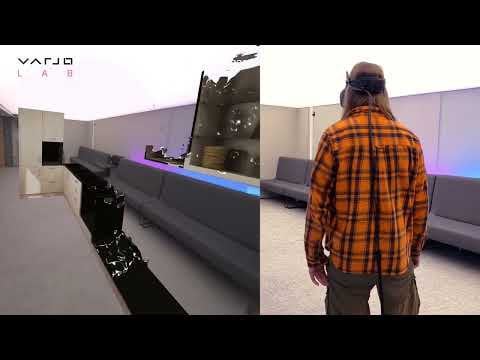
>Cooking up an XR demo experience > >In the demo, the user begins by aligning a floor plan to a clear space in a real environment, using the pass-through camera feed of a Varjo XR-3 mixed reality headset. (The demo can also be run in VR-only headsets including the Varjo Aero and VR-3, but the kitchen will then be rendered within a fully virtual environment.) > >After the floor plan is aligned in a suitable space, the player can summon the virtual kitchen to appear around them. The user can then easily change colors and materials used for the floor, cabinets, handles, and worktop. > >For this demo, we have created two types of animated transition effects for unveiling and hiding the virtual walls and contents of the kitchen. Having transitions gives the user a more enjoyable experience of the demo instead of just making items snap instantly into place. > >The first effect is a gradually evolving, animated dissolve effect. It is done with the Unity shader graph. The dissolve effect has some somewhat magical visual properties since it really looks like the kitchen is appearing from thin air in front of the user. > >The second transition, for the surrounding room, is an animated scale effect, with a cartoon-like animation curve that gives the impression that items are popping up all around like mushrooms. > >One of the really striking features in this demo is the functioning virtual window in the kitchen. The player can see the real world through the window, just as if the kitchen was an actual set in the room. > >More: [https://varjo.com/vr-lab/designing-a-kitchen-in-mixed-reality/](https://varjo.com/vr-lab/designing-a-kitchen-in-mixed-reality/)
TheJessicator
Pity the space has to already have been cleared. One would think one would want to have your design pretty much agreed upon prior to any demolition. Otherwise this is great!

2 Comments
>Cooking up an XR demo experience
>
>In the demo, the user begins by aligning a floor plan to a clear space in a real environment, using the pass-through camera feed of a Varjo XR-3 mixed reality headset. (The demo can also be run in VR-only headsets including the Varjo Aero and VR-3, but the kitchen will then be rendered within a fully virtual environment.)
>
>After the floor plan is aligned in a suitable space, the player can summon the virtual kitchen to appear around them. The user can then easily change colors and materials used for the floor, cabinets, handles, and worktop.
>
>For this demo, we have created two types of animated transition effects for unveiling and hiding the virtual walls and contents of the kitchen. Having transitions gives the user a more enjoyable experience of the demo instead of just making items snap instantly into place.
>
>The first effect is a gradually evolving, animated dissolve effect. It is done with the Unity shader graph. The dissolve effect has some somewhat magical visual properties since it really looks like the kitchen is appearing from thin air in front of the user.
>
>The second transition, for the surrounding room, is an animated scale effect, with a cartoon-like animation curve that gives the impression that items are popping up all around like mushrooms.
>
>One of the really striking features in this demo is the functioning virtual window in the kitchen. The player can see the real world through the window, just as if the kitchen was an actual set in the room.
>
>More: [https://varjo.com/vr-lab/designing-a-kitchen-in-mixed-reality/](https://varjo.com/vr-lab/designing-a-kitchen-in-mixed-reality/)
Pity the space has to already have been cleared. One would think one would want to have your design pretty much agreed upon prior to any demolition. Otherwise this is great!